 ASPL Console
Select an input route deliberately
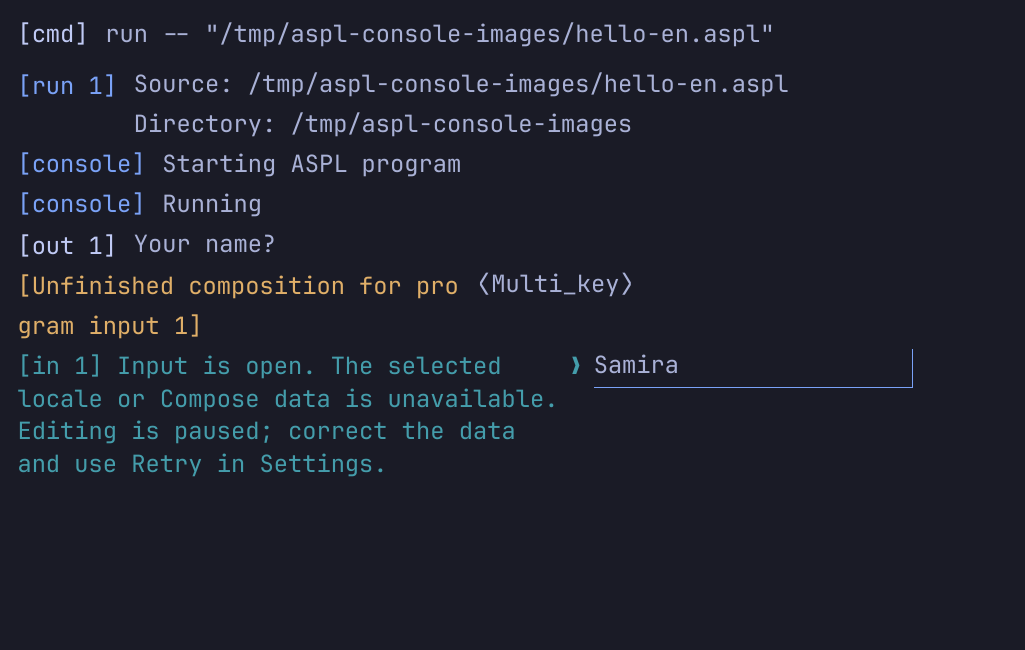
An input route is the text-entry method used by Console prompts and temporary text controls. It is separate from the input owner, interface language and desktop-wide input configuration. These instructions describe Console 0.8.0. The capture below records a Local Compose failure on the verified archive; other host and route limits still apply.
Console considers the actual Qt display backend and original Qt/GTK/X11 input hints. Finding a service does not select it. Conflicting, unknown or unresolved intent opens a temporary route chooser. Cancel leaves editing paused. Open Settings with Ctrl+Comma, choose Fcitx, IBus or Local Compose, then Apply. See input choices and Apply/Cancel.
Accepted native backends are Wayland and Qt XCB on X11/XWayland. Legacy XIM and compositor-managed text input are excluded. Do not assume every desktop or input engine is supported. Input-route choice applies only to this window and is not saved.
Use private Fcitx and supported keyboards
Fcitx uses Console's private patched Core, helpers, addon allowlist, writable storage and shared data. It needs no desktop Fcitx daemon or desktop profile and does not change their settings. Keep the complete installed layout together, including private libraries and helpers.
Settings offers Use system keyboard by default, fixed English US and fixed standard Arabic. Standard Arabic uses Western digits on its number row. Keyboard preference is saved and independent of interface language. The fixed choices stay fixed. Use system keyboard follows only verified US/standard Arabic layout and group changes. The recorded Wayland implementation uses read-only Hyprland detection and keymap agreement; XCB reads physical X11 state. The final archive was checked on Hyprland and XCB; other Wayland compositors remain unverified.
If a layout is unsupported or unverified but physical state is usable, choose fixed Arabic or English US, or correct the system layout. If physical state is unavailable, editing pauses even with a fixed preference. Changing keyboard intent retains visible unfinished composition separately and starts fresh input state. Retry re-reads physical keyboard state when following the system.
Prepare an external IBus daemon and engine
IBus connects to the deliberately selected external daemon and engine. Prepare and select them outside Console; Console neither starts nor configures them. The bundled client libraries remain private and do not supply a running daemon or an installed engine. Check the reported endpoint and engine if setup fails or the connection disappears.
Candidates and auxiliary text appear in a read-only in-window view. Use the engine's native keyboard navigation and confirmation. A visible candidate list does not promise clickable candidate selection or universal engine support.
Prepare host Local Compose data
Local Compose uses the selected host locale, Compose table and its includes without a daemon. Prepare usable locale/table data on the host. Missing, invalid or concurrently changed data pauses editing rather than silently choosing another table. Correct the reported data problem and explicitly Retry. Installation prerequisites are summarized in Install.
An incomplete Compose sequence is unfinished composition, not committed text. Enter retains and cancels that unfinished sequence; another Enter is needed to submit the unchanged committed draft. Retry starts a new sequence rather than completing the old one.
Confirm composition and enter Unicode
Preedit is visible unfinished composition in its original editor. Candidates appear inside the window. Use native navigation keys to select a candidate. Enter confirms active native composition before a later Enter submits the committed line or performs a temporary control's action. Local Compose's incomplete-sequence behavior is described above.
For Fcitx, Ctrl+Alt+Shift+U opens Unicode search and Ctrl+Shift+U opens direct hexadecimal input. Their commands use Latin physical-key syntax with either supported keyboard. They belong to the Fcitx route; do not assume IBus or Local Compose supplies the same commands. Unicode entry still follows the active owner's validation and submission rules.
Keep input owners and retained work separate
The command prompt, each individual run and temporary text controls are separate input owners. Keyboard focus and the native input-method context do not change that ownership. During a run, even settings and exit belong to the program. Use Ctrl+Comma for Settings rather than submitting those words. See run input ownership.
| Text state | What it means |
|---|---|
| Committed draft | Accepted text that has not been submitted. The current owner's draft survives an input-route pause. |
| Unsent program input | A run's unsubmitted committed draft retained for inspection when EOF, Stop or completion ends its editing opportunity. It remains with that run. |
| Unfinished composition | Visible input-method text not committed to its owner. It is retained separately when focus, route or ownership changes, and is not restored as active composition. |
| Delivery-unconfirmed input | An already submitted line whose delivery did not complete with confirmation. Some bytes may have reached the program. It is not wholly unsent input. |
Focus loss retains visible unfinished composition under its old owner; returning restores only the committed draft. Run retirement rejects old-owner callbacks. Retained work never becomes the next command or another run's input, and program input never enters command history. Read sending and outcomes before considering another attempt.
Read a paused-editing message
Absent services, setup failure, live stall/disconnection and uncertain input-method delivery have distinct diagnostics. A paused route preserves committed drafts and retains visible unfinished composition separately. Text mutation, paste and submission pause. Selection/copy and keyboard access to Settings remain available; output can still be read.
Read and correct the actual reported endpoint, physical keyboard, resource or helper problem. Do not infer that a timed-out key was harmless or retype queued keys automatically. A visible retained composition record is for inspection, not proof that its text was committed or sent to a program.
Repair, then explicitly Retry
- Read the failure message and preserve any text you need to inspect by selecting/copying it.
- Correct the stated cause: prepare the external IBus daemon/engine, fix host Compose data, correct physical keyboard state or repair installed resources as applicable.
- Open Settings with Ctrl+Comma. If changing routes or Fcitx keyboard preference, Apply first. A pending different route is not used by Retry.
- Reopen Settings if Apply closed it, then use Retry input route for the current intent. Dismiss Settings and return focus to the owning editor. Fresh native setup may begin when text entry regains focus; inspect readiness or the new failure message before continuing.
Retry preserves the committed draft and creates fresh input state for the same route intent. It never replays queued keys, restores unfinished composition, sends retained text, restarts a desktop daemon or retries automatically. It does not replay program input, restart a run or undo effects. Already submitted delivery-unconfirmed input needs the run recovery guidance. Retry is an immediate action; cancelling Settings afterwards does not undo it.
For a symptom-oriented entry point, use paused-input troubleshooting.
Repair loader failure before the GUI
Missing helpers or loader dependencies require installation repair. In-window Retry cannot install libraries, restore a broken installation or repair a loader failure before the GUI opens. Restore the complete matching installation and check the installation layout and host prerequisites, then relaunch. Do not treat a desktop daemon restart as a substitute for missing private files.
Paused input in Console 0.8.0