 ASPL Console
Save the minimal source
First follow Install and requirements. These instructions describe Console 0.8.0 with ASPL 0.7.0. Verify the selected release and tool pairing before following them.
Release facts are bound to the verified archive and publication receipt. Verify file checksums before installation.
Create a working directory in a file manager, for example /home/samira/console-first-run. Download the original hello-en.aspl below into it, or save its exact text in an external editor with UTF-8 encoding. Console runs saved source; it is not a source editor. The English vocabulary remains English in either documentation locale.
fn start_main() -> i64 {
    print("Your name?\n");
    let name: string = read_line();
    print("Hello, " + name + "\n");
    return 0;
}
This program prints a question, reads one line, prints a greeting and returns 0. It needs no additional data files. The equivalent supplied Arabic source can be saved as hello-ar.aspl in the same directory:
دالة ابدأ_الرئيسية() -> ص64 {
    اطبع("ما اسمك؟\س").
    دع اسم: نص = اقرأ_سطر().
    اطبع("مرحباً، " + اسم + "\س").
    أرجع 0.
}
Set the Console current directory
Start the executable inside the complete installation with your separate ASPL tool. Replace the sample installation and tool paths with your own:
"$HOME/.local/opt/aspl-console-0.8.0-linux-x86_64/bin/aspl-console" --aspl "$HOME/.local/bin/aspl"
At the Console command prompt, enter these commands separately, replacing the directory with your actual absolute path:
cd -- "/home/samira/console-first-run"
pwd
cd succeeds silently; pwd reports the physical absolute directory. A failed cd retains the previous directory. Both English and Arabic aliases work: انتقل and مسار. Paths are literal. Console does not expand ~ or $HOME, so use the actual absolute path here. See directory navigation.
The current directory starts at the usable physical Linux launch directory, with an explained home fallback if necessary. A run captures the Console current directory for relative runtime data and TLS files. Source imports follow the canonical source location. Running an absolute source does not change the current directory. This example has no data files, but choosing the directory now makes later programs predictable.
Launch the saved source
Enter at the command prompt:
run -- hello-en.aspl
Press Enter to validate and start. For the Arabic source use تشغيل -- hello-ar.aspl or run -- hello-ar.aspl. A missing or unreadable source, invalid tool or unusable directory fails without starting a program. Correct the reported path or tool, then submit again. The prompt is read-only during Starting and Finalizing. See the precise run contract.
You can instead pass a source operand when starting the application from a Linux terminal:
"$HOME/.local/opt/aspl-console-0.8.0-linux-x86_64/bin/aspl-console" --aspl "$HOME/.local/bin/aspl" "/home/samira/console-first-run/hello-en.aspl"
That operand prefills a safely quoted absolute run -- draft. It does not execute the source. Press Enter on the run draft to validate and start. The source operand does not set the current directory. To inspect or change it first, retain the source path, replace the draft with pwd and the cd command above, then re-enter run -- with the absolute source path. A representable missing file stays a draft until Enter. Unrepresentable paths leave an empty usable prompt with an explanation. Launch options explain quoting and tool precedence.
Send one line
When stdout shows Your name? and the prompt belongs to the active run, enter:
Samira
Press Enter to send the line. Finish any input-method composition first; Enter can commit composition rather than submit. Submission writes the committed text and a newline to the program. Sending can remain pending; an accepted submission is not proof the program consumed it. Do not resend uncertain input automatically. If editing pauses, open Settings with Ctrl+, correct the reported input-route problem and choose Retry input route explicitly. Unfinished composition is retained separately, and Retry never replays it.
During a run, command-looking text such as help, clear or exit is program input. This greeting program would greet that text. Console never dispatches it as a command while the run owns the prompt. Ctrl+D requests EOF and Ctrl+C requests Stop in the active-run context. Stop cannot undo delivered input or program effects, and completion waits for an observed outcome. Those controls are unnecessary for this one-line example.
Read the observed outcome
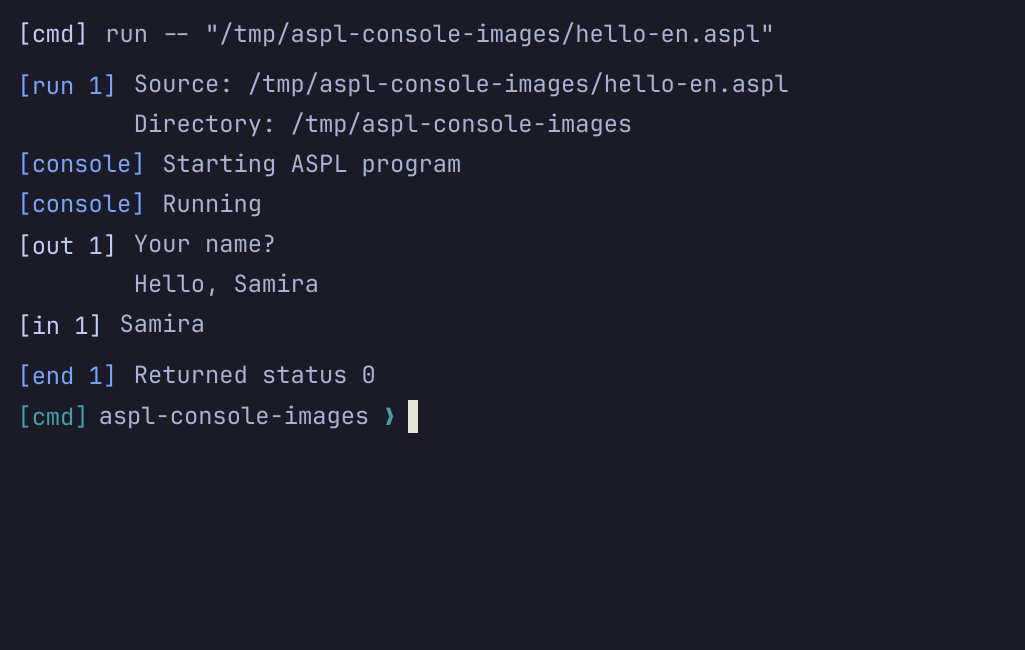
For the supplied English source and Samira, stdout contains:
Your name?
Hello, Samira
For the supplied Arabic source and the same input:
ما اسمك؟
مرحباً، Samira
Console labels stdout and stderr separately. After final output, it records the observed exit status 0 and restores an empty command prompt. Check the greeting and that terminal record together; an exit number alone is not proof of success. A launch, preflight or supervision error is a different outcome. Once the command prompt returns, enter help or مساعدة to continue.
Previous: Install. Continue with Running programs and interactive input. For language lessons, use ASPL in English.